
tabbaze · Guide
Save Links Online in One Visual Dashboard
Saving links is easy. Keeping them useful is the hard part. A personal website dashboard makes your links visible, grouped and ready when you need them.
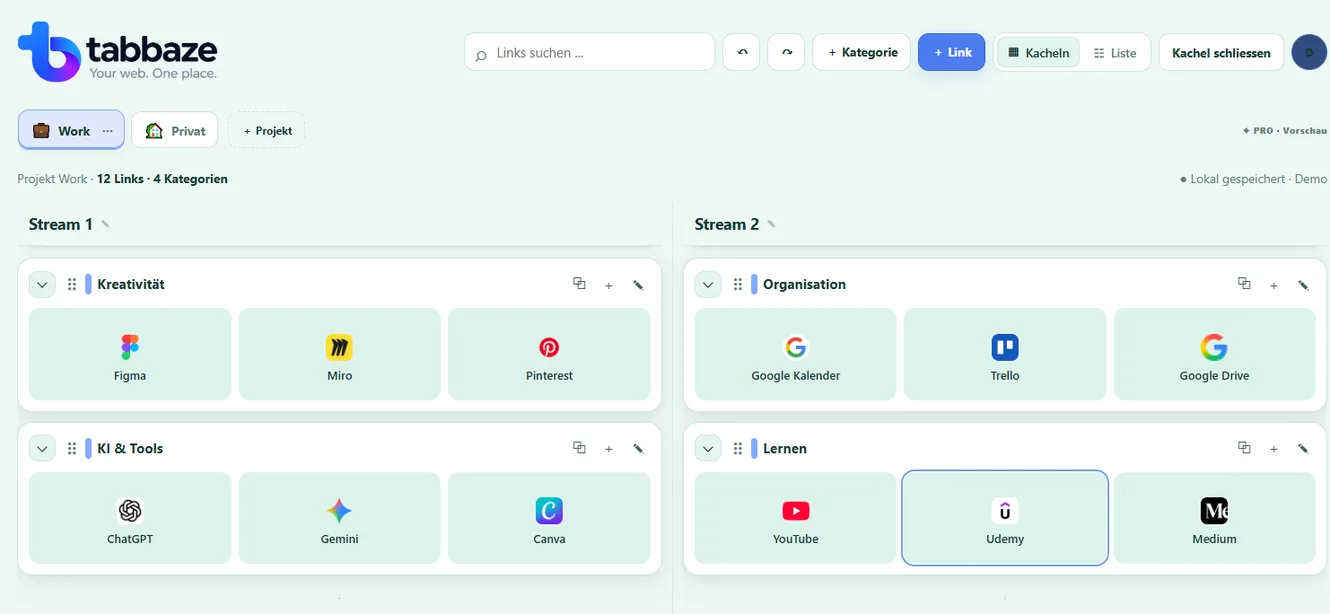
Build your own link library
Choose the websites and web tools you actually use. Instead of relying on a long list of browser favorites, create a clear collection with familiar visual tiles. Give links short descriptions to remember why you saved them.
Keep work and personal sites separate
Different projects are useful for different parts of life. Within each project, categories group similar tools together. On desktop you can organize categories in four independent lanes or switch to a compact list.
What happens to your saved links?
During the beta, links stay in your browser. JSON backup and restore are included in Free, but do not provide cloud sync. Clearing browser data may remove your local links.
A practical way to group websites
Use a project for a broad context such as Work, Study or Personal. Within it, create categories like Communication, Design and Reference. Add individual website links beneath each category. This makes your most-used web apps easier to scan and provides a consistent place to save new resources.
Saving a link is different from managing tabs
A saved link is a reusable shortcut to a website. An open tab is a page currently loaded in your browser. tabbaze lets you keep the shortcuts you choose, but it does not automatically capture, suspend, close or synchronize your open tabs.
Practical tip: Start with the five websites you open every day. Add more categories only when you need them. Export a backup regularly.
A practical example
Example: Keep a useful link library
Organize websites worth revisiting by topic and give them a short description when it helps.
This is a simplified illustration, not automatic importing of browser bookmarks.
- YouTube – Tutorials
- Medium – Articles
- Wikipedia – Reference